On this page
Java is a versatile programming language that offers a variety of data structures to store, manage, and manipulate data. Among these, Java List is a crucial data structure that’s widely utilized due to its dynamic nature and ability to hold an ordered collection of elements. Sorting is a fundamental operation that organizes elements into a specific order, enhancing the efficiency and accessibility of data.
Key Takeaways:#
- Understanding of Java List and its functionalities.
- Different methods to sort a List in Java.
- Practical examples demonstrating list sorting.
- Comparison of various sorting methods.
Understanding Java List#
A Java List is an ordered collection, also known as a sequence, where the user has precise control over where in the list each element is inserted. Unlike sets, lists typically allow duplicate elements, making them a flexible choice for many programming scenarios.
Features of Java List:#
- Ordered Collection: The elements in a list are ordered in a specific sequence.
- Index Access: Elements can be accessed by their integer index.
- Duplicate Elements: Lists typically allow the presence of duplicate elements.
- Various Implementations: Such as ArrayList, LinkedList, etc.
Methods to Sort a List in Java#
Sorting is essential for efficiently accessing and managing data. In Java, various methods can be used to sort a list.
Using Collections.sort() Method#
The Collections.sort() method is a straightforward and effective way to sort lists in Java. By default, it sorts the list in ascending order:
Collections.sort(list);Here’s a practical example of sorting a list of integers using the Collections.sort() method:
import java.util.*;

public class Main {
    public static void main(String[] args) {
        List<Integer> numbers = Arrays.asList(3, 1, 4, 1, 5, 9);
        Collections.sort(numbers);
        System.out.println(numbers);  // Output: [1, 1, 3, 4, 5, 9]
    }
}
Other Sorting Methods#
Apart from the Collections.sort() method, several other methods can aid in sorting a list in Java:
stream.sorted()methodComparator.reverseOrder()methodComparator.naturalOrder()methodCollections.reverseOrder()method
Each of these methods has its use cases and can be chosen based on the requirement.
Practical Examples#
Practical examples are crucial for understanding the application of sorting methods in real-world scenarios.
// Example demonstrating the use of Comparator.reverseOrder() method
Collections.sort(list, Comparator.reverseOrder());
Comparison of Sorting Methods#
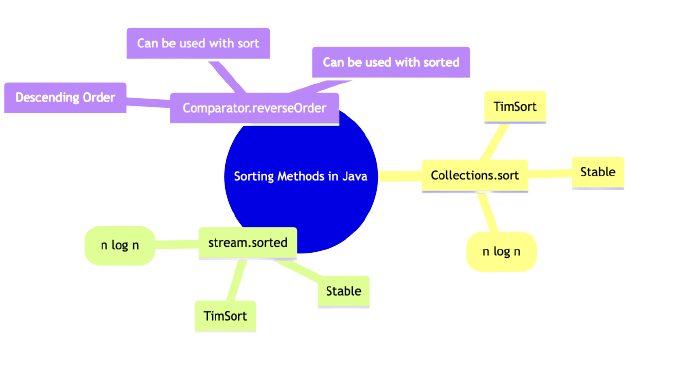
Comparing different sorting methods helps in understanding the advantages and disadvantages of each, aiding in making an informed decision based on the use case.
| Method | Time Complexity | Space Complexity | Stability |
|---|---|---|---|
Collections.sort() |
O(n log n) | O(n) | Yes |
stream.sorted() |
O(n log n) | O(n) | Yes |
Comparator.reverseOrder() |
O(n log n) | O(1) | No |
Advanced Sorting Techniques#
Java provides advanced sorting techniques that cater to more complex sorting requirements, especially when dealing with objects in a list.
Sorting Objects in a List#
Sorting objects in a list requires a bit more setup compared to sorting primitive types or wrapper classes. Typically, the objects’ class would need to implement the Comparable interface, or a Comparator would need to be provided.
// Sorting a list of objects using Comparable
Collections.sort(list);

// Sorting a list of objects using Comparator
Collections.sort(list, new CustomComparator());
Sorting Using Custom Comparators#
Custom comparators provide a way to define your own sorting logic, allowing for a high degree of customization:
// Defining a custom comparator
class CustomComparator implements Comparator<MyObject> {
    public int compare(MyObject o1, MyObject o2) {
        return o1.customField - o2.customField;
    }
}

// Using the custom comparator to sort a list
Collections.sort(list, new CustomComparator());
External Libraries for Sorting#
While Java provides robust sorting capabilities, external libraries can offer additional features or improved performance.
- Apache Commons Collections: Provides a plethora of sorting and other collection-related utilities.
- Google Guava: Offers ordering functionality which is a powerful, yet flexible abstraction for sorting.
For further exploration, you may refer to TraceDynamics which provides more insights into sorting ArrayList in Java.
Frequently Asked Questions#
- What is the difference between
Collections.sort()andArrays.sort()?Collections.sort()is designed for sorting elements of Collections, whileArrays.sort()is for sorting arrays.
- How can I reverse the order of elements while sorting?
- Use
Collections.reverseOrder()or a custom comparator.
- Use
- What are the time complexities of different sorting methods in Java?
- Most sorting methods have a time complexity of O(n log n), although the exact time complexity can vary based on the method and the input data.
- Can I create a custom sorting order in Java?
- Yes, by creating a custom comparator.
- Are there external libraries that can help with sorting in Java?
- Yes, libraries such as Apache Commons Collections and Google Guava provide additional sorting utilities.